Xerox C8055 Printer – Complete Guide, Features, Uses, Maintenance & Supplies
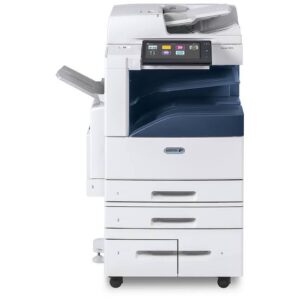
Xerox C8055 is a high-performance color multifunction printer designed for businesses, offices, print shops, educational institutions, and professional environments that require reliable and high-quality color printing. The Xerox C8055 can handle everyday document printing as well as professional marketing materials, presentations, brochures, and other color documents.
In this guide, we will discuss the Xerox C8055 printer, its features, common applications, maintenance requirements, essential printer parts and supplies, and tips for keeping the machine operating efficiently.
What Is the Xerox C8055 Printer?
The Xerox C8055 is part of Xerox’s professional color multifunction printer family. It is designed to provide dependable color output, efficient document production, scanning, copying, and office workflow capabilities.
For businesses that regularly print large quantities of documents, maintaining the printer with compatible consumables and replacement parts is important for consistent print quality and reliable performance.
Key Features of Xerox C8055
High-Quality Color Printing
The Xerox C8055 is designed for professional-quality color documents. It can produce sharp text, detailed graphics, and vibrant color output when the correct toner and maintenance components are used.
Multifunction Capability
Depending on the configuration, the Xerox C8055 can support multiple office functions such as printing, copying, and scanning. This makes it useful for organizations that need several document-management functions from one machine.
Suitable for Business Printing
The Xerox C8055 is suitable for offices, corporate environments, educational organizations, commercial print operations, and other workplaces where consistent color printing is important.
Where Is Xerox C8055 Commonly Used?
The Xerox C8055 can be useful in a variety of professional environments, including:
- Corporate offices
- Schools and educational institutions
- Government offices
- Advertising agencies
- Design studios
- Print shops
- Marketing departments
- Business service centers
Why Proper Maintenance Is Important for Xerox C8055
Regular maintenance helps keep a Xerox C8055 operating smoothly. Printer components can gradually wear because of continuous printing, heat, toner usage, paper movement, and mechanical operation.
Replacing worn components at the appropriate time can help reduce print-quality problems and unexpected downtime.
Common Maintenance Components
Depending on the machine’s condition and service requirements, technicians may need to inspect or replace components such as the fuser unit, charge unit, charge grid, charger roller, transfer components, cleaning blade, rollers, and other maintenance parts.
Common Xerox C8055 Print Quality Problems
Lines or Marks on Printed Pages
Lines, streaks, or unwanted marks may be related to dirty or worn imaging and cleaning components. Paper quality and toner-related issues should also be considered when troubleshooting print defects.
Uneven or Faded Color
Uneven color density or faded output may occur because of toner-related problems, imaging components, calibration issues, or other printer maintenance requirements.
Repeating Marks
Repeated marks appearing at regular intervals can sometimes indicate a worn or contaminated rotating printer component. Professional inspection can help identify the exact source of the problem.
Paper Feeding Problems
If paper does not feed correctly, rollers and other paper-path components should be inspected. Dust, paper debris, worn rollers, and incorrect paper settings can contribute to feeding problems.
Xerox C8055 Printer Parts and Supplies
Using compatible and reliable replacement parts is important when servicing a Xerox C8055. The correct component depends on the printer configuration and the specific maintenance issue.
Commonly searched Xerox C8055 parts and supplies include:
- Xerox C8055 toner
- Xerox C8055 fuser unit
- Xerox C8055 charge unit
- Xerox C8055 charge grid
- Xerox C8055 charger roller
- Xerox C8055 IBT cleaning blade
- Xerox C8055 maintenance parts
- Xerox C8055 replacement parts
How to Maintain a Xerox C8055 Printer
Keep the Printer Clean
Dust and paper particles can accumulate inside a printer over time. Regular cleaning according to the manufacturer’s service procedures can help maintain reliable operation.
Use Suitable Paper
Using the correct paper type and size can help reduce paper-feed problems and improve overall print quality.
Check Consumables Regularly
Monitor toner and maintenance components regularly. Replacing components before they become severely worn can help reduce unexpected printing problems.
Use Qualified Technicians for Service
Internal printer components can require specialized knowledge and tools. For complicated repairs or component replacement, professional printer technicians should be used.
Internal Links for Xerox C8055 Products
If you are looking for Xerox C8055 replacement parts and supplies, you can create internal links from this article to your relevant product and category pages.
- Xerox C8055 Parts & Supplies
- Xerox C8055 Fuser Unit
- Xerox C8055 Charge Unit
- Xerox C8055 Charge Grid
- Xerox C8055 Charger Roller
- Xerox C8055 IBT Cleaning Blade
Note: Replace the example URLs above with the actual URLs of your Xerox C8055 product pages on your website.
How to Choose Xerox C8055 Replacement Parts
Before purchasing a replacement part, check the exact printer model and the component required for the repair. Part compatibility is important because similar Xerox printer models may use different components.
When buying a Xerox C8055 part, consider the following:
- Exact printer model
- Part name
- Part number, if available
- Compatibility
- Product condition
- Supplier reliability
- Warranty or replacement policy
Benefits of Using Quality Xerox C8055 Parts
Quality replacement parts can help maintain consistent printer performance and reduce the possibility of recurring maintenance problems. Reliable components can also help technicians complete repairs more effectively.
Xerox C8055 Printer Maintenance Tips
- Clean the printer regularly.
- Keep the paper path free from debris.
- Use suitable paper and media settings.
- Monitor toner and maintenance components.
- Replace worn parts when required.
- Follow recommended service procedures.
- Use compatible replacement parts.
Frequently Asked Questions About Xerox C8055
What is the Xerox C8055 used for?
The Xerox C8055 is designed for professional color printing and multifunction office workflows. It can be used in businesses, offices, educational organizations, print shops, and other professional environments.
Where can I buy Xerox C8055 parts?
Xerox C8055 replacement parts can be purchased from specialized printer-parts suppliers. Before ordering, always verify the printer model and part compatibility.
What are common Xerox C8055 maintenance parts?
Common maintenance-related components may include the fuser unit, charge unit, charge grid, charger roller, IBT cleaning blade, rollers, and other internal printer components.
Why is my Xerox C8055 printing lines?
Lines or streaks can have several causes, including dirty or worn imaging components, cleaning components, toner issues, or other internal printer problems. Proper diagnosis is recommended before replacing a part.
How can I improve Xerox C8055 print quality?
Keep the printer clean, use suitable paper and consumables, monitor maintenance components, and replace worn parts when necessary. If the problem continues, have the printer inspected by a qualified technician.
How do I know which Xerox C8055 part I need?
Check the exact model, identify the printer symptom, and compare the required component with the printer’s service information or existing part. If you are unsure, consult a qualified technician before ordering.
Conclusion
The Xerox C8055 is a professional color multifunction printer suitable for demanding office and business environments. Proper maintenance, suitable consumables, and compatible replacement parts are essential for maintaining reliable performance and consistent print quality.
If you need Xerox C8055 printer parts, toner, fuser units, charge components, charger rollers, IBT cleaning blades, or other maintenance supplies, choosing the correct compatible component can help keep your printer operating efficiently.