A professional Xerox printer is an important investment for offices, businesses and commercial print shops. When a machine is used regularly, proper Xerox printer maintenance becomes essential for maintaining print quality, reducing unexpected downtime and extending the useful life of important components.
In Bangladesh, many businesses depend on Xerox machines for everyday document production as well as commercial printing. Models such as the Xerox C70, Xerox C70 Pro and Xerox C8055 can handle demanding workloads, but like any professional printing equipment, they require appropriate maintenance and timely replacement of worn parts.
This guide explains some of the most common Xerox printer maintenance requirements and what to consider when your machine starts showing print-quality or performance problems.
Why Is Xerox Printer Maintenance Important?
Regular maintenance helps keep a printer operating consistently.
Without proper maintenance, problems can gradually develop in components such as the:
- Drum
- Fuser
- Transfer system
- Charge system
- Toner system
- Paper-feed system
- Cleaning components
For a busy print shop, a small machine problem can become a bigger issue if it is ignored for too long.
Regular inspection can help identify worn or contaminated components before they significantly affect production.
Common Xerox Printer Problems
Different problems can have different causes. Some of the most common issues include:
Poor Print Quality
If prints suddenly become light, uneven or inconsistent, the cause may involve toner, imaging components, drum condition, charging components or other parts of the printing system.
The exact cause should be diagnosed according to the machine model and the symptoms.
Black Lines or Unwanted Marks
Lines, streaks or repeated marks on printed pages can sometimes be related to:
- Drum condition
- Cleaning blade
- Fuser components
- Transfer components
- Dirty internal areas
Replacing a component without diagnosing the actual problem may not solve the issue. Proper inspection is therefore important.
Xerox Printer Drum Maintenance
The drum is a critical component of the imaging process.
Over time, normal usage can cause wear. A worn drum may contribute to:
- Uneven print quality
- Repeated marks
- Lines
- Backgrounding
- Other image defects
For machines such as the Xerox C70, using the correct compatible drum or drum-related component is important.
If you need a replacement component, always confirm the exact printer model and part compatibility before ordering.
Related product:
OPC Drum for Xerox C70
Xerox Printer Fuser Problems
The fuser is responsible for fixing toner onto the printed media.
A problem with the fusing system can result in symptoms such as:
- Toner not properly adhering to paper
- Smearing
- Repeated marks
- Uneven fixing
- Abnormal paper output
Depending on the machine and the problem, the required replacement may involve a fuser unit, fuser film, heat roller or another fuser-related component.
For example, Xerox C70 users may need individual fuser components rather than replacing an entire assembly, depending on the specific issue.
Related products:
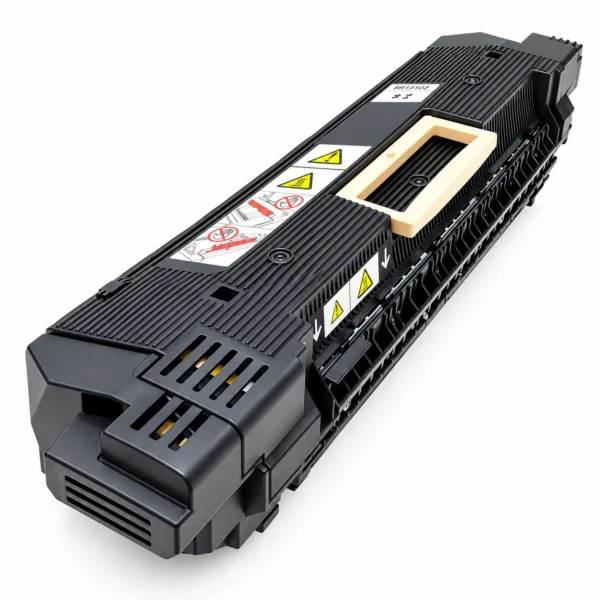
Fuser Heat Roller for Xerox C70
Xerox Printer Toner Maintenance
Toner is another important part of maintaining consistent print output.
Using an appropriate toner and keeping the toner system properly maintained can help avoid unnecessary print-quality problems.
If you are using a Xerox C70, for example, make sure the toner is appropriate for the machine and that the correct color and component are being used.
Related:
Xerox C70 Toner Powder
Xerox C70 Maintenance
The Xerox C70 is used for professional color printing applications, so maintenance becomes particularly important when the machine is operating at a high print volume.
A basic maintenance checklist can include:
1. Check print quality
Look for:
- Lines
- Spots
- Color inconsistency
- Background
- Uneven density
- Toner adhesion problems
2. Check consumables
Inspect toner and other consumable components according to the machine’s maintenance requirements.
3. Inspect imaging components
The drum, charge components and transfer system can affect the final image quality.
4. Check the fuser
Look for symptoms associated with poor toner fixing or unusual marks.
5. Clean the machine properly
Dust, toner residue and paper debris can affect machine operation and print quality.
When Should You Call a Xerox Printer Technician?
You should consider professional service when:
- Print quality suddenly deteriorates
- The machine repeatedly displays an error
- Paper jams occur frequently
- Toner is not fixing correctly
- Unusual noises develop
- A component repeatedly fails
- The machine stops during production
- Regular maintenance is overdue
Trying to replace complicated internal components without proper knowledge can sometimes create additional problems.
Professional diagnosis can help determine whether the problem is related to a consumable, a replaceable part or another machine component.
Xerox Printer Service in Bangladesh
For businesses operating Xerox machines, access to printer repair, maintenance and compatible spare parts is important.
Xerox BD provides support related to Xerox printing equipment for:
- Print shops
- Commercial printing businesses
- Offices
- Corporate organizations
- Educational institutions
- Other professional printing environments
The objective is not simply to replace parts, but to identify the actual problem and select the appropriate solution for the machine.
How to Reduce Xerox Printer Downtime
For a commercial printing business, machine downtime can affect customer delivery schedules and production.
You can reduce unnecessary downtime by:
✔ Following a regular maintenance routine
✔ Monitoring print quality
✔ Replacing worn components when necessary
✔ Keeping commonly required parts available
✔ Using compatible and appropriate consumables
✔ Addressing recurring errors instead of repeatedly ignoring them
✔ Getting professional technical assistance when required
Xerox Printer Spare Parts in Bangladesh
Depending on the model, Xerox printer users may need different replacement components.
Common Xerox-related parts and supplies include:
- Toner powder
- OPC drum
- Drum unit
- Fuser unit
- Fuser film
- Heat roller
- Charge unit
- Charge grid
- Charger roller
- IBT cleaning blade
- Transfer-related components
Not every part is compatible with every Xerox model.
Always check the exact model and part specification before purchasing a replacement component.
Xerox BD: Machines, Parts & Service Support
Xerox BD is focused on supporting the printing needs of customers in Bangladesh.
Our product and service offerings cover Xerox machines, printer parts, printing supplies and technical service support.
Whether you are purchasing a professional Xerox printer or maintaining an existing machine, selecting the correct equipment and replacement components can help maintain reliable printing performance.
Frequently Asked Questions
How often should a Xerox printer be serviced?
Service frequency depends on the printer model, print volume, operating environment and machine condition. High-volume printing environments may require more frequent inspection and maintenance.
Why is my Xerox printer producing lines?
Lines can have several possible causes, including drum, cleaning, transfer, charging or fuser-related issues. The exact cause should be diagnosed from the machine and print pattern.
When should a Xerox drum be replaced?
A drum may require replacement when it becomes worn or when persistent print-quality problems indicate that the drum is no longer performing properly.
Can I replace only the Xerox fuser film?
For some Xerox models, individual fuser components such as fuser film or heat rollers may be available. Compatibility must be checked for the exact machine model.
Where can I get Xerox printer service in Bangladesh?
Xerox BD provides Xerox-related machine, parts and service support for customers in Bangladesh.
Conclusion
Proper Xerox printer maintenance in Bangladesh is important for businesses that depend on reliable printing every day.
Regular inspection, appropriate consumables, timely replacement of worn components and professional technical support can help maintain print quality and reduce unexpected machine downtime.
If you operate a Xerox C70, C70 Pro, C8055 or another professional Xerox printer, make maintenance part of your regular printing operation rather than waiting until a major problem occurs.
Need Xerox Printer Parts or Service?
Xerox BD provides Xerox machines, printer parts, printing supplies and service support in Bangladesh.
Visit: XeroxBD.com
Contact Xerox BD for machine, parts and service requirements.